Tutorials
How do I add a marketing opt-in to the checkout?
This article covers how to insert a checkbox into the checkout flow, that when ticked, will allow you to send information to a third party system.
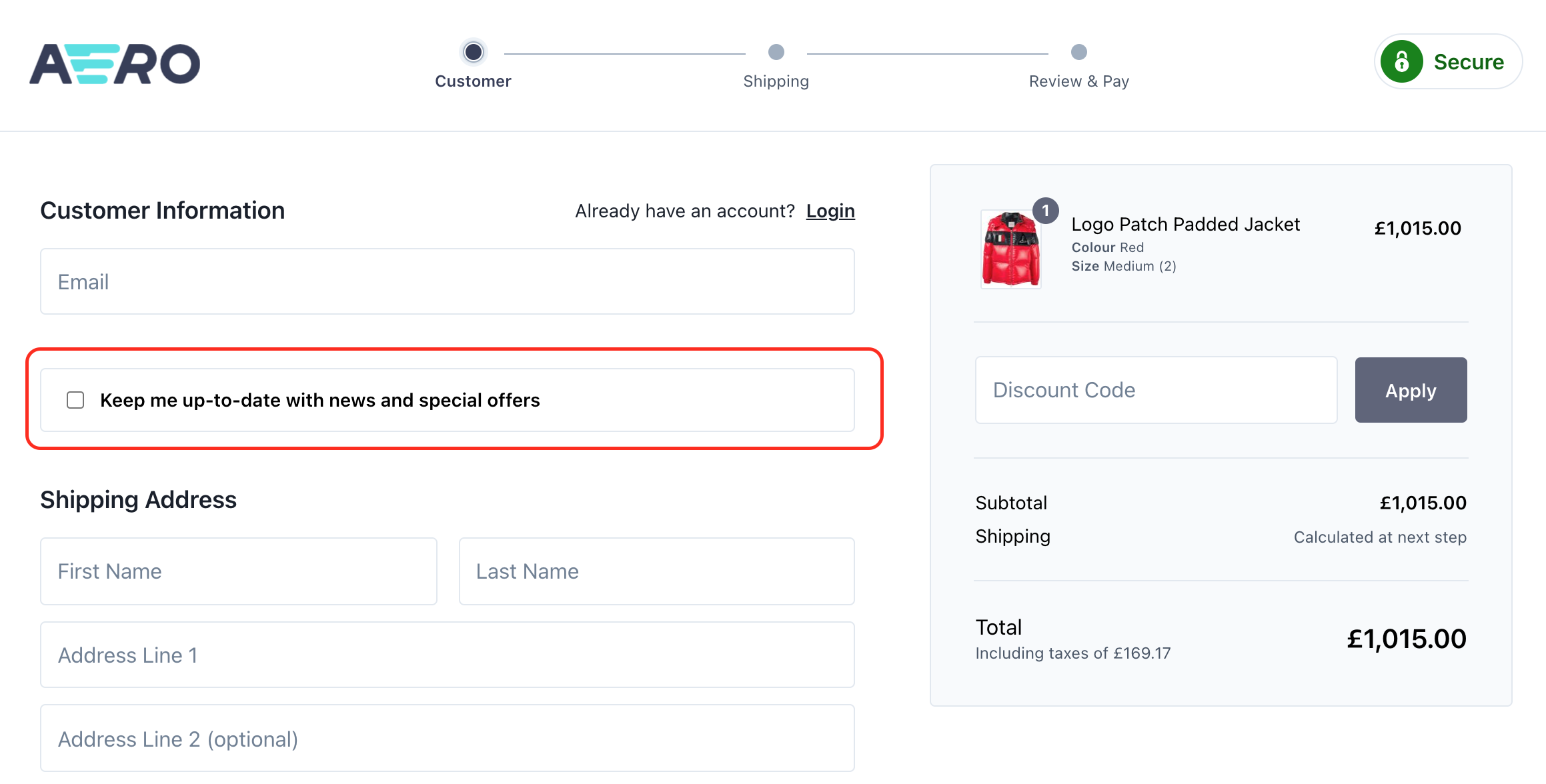
In order to add a marketing optionally opt-in to the checkout we first need to extend the CheckoutCustomerPage to inject our custom view that will show the checkbox for the customer to interact with:
\Aero\Checkout\Http\Responses\CheckoutCustomerPage::extend(function (\Aero\Checkout\Http\Responses\CheckoutCustomerPage $page, \Closure $next) {
    $sections = $page->getData('form_sections');

    $customerSectionIndex = $sections->keys()->search('customer', true);

    $sections = $sections->splice(0, $customerSectionIndex + 1)
        ->put('opt_in', 'checkout.opt-in')
        ->merge($sections);

    $page->setData('form_sections', $sections);

    $order = $page->cart->order();

    if ($order && ($optIn = $order->additional('opted_in'))) {
        $page->setData('opted_in', $optIn);
    }

    return $next($page);
});
We then need to create our Twig view file, which should be placed in resources/views/checkout/opt-in.twig:
<div class="checkout__section">
    <div class="checkout__list">
        <ul>
            <li>
                <label>
                    <input type="checkbox" name="opted_in" value="1" {{ old('opted_in', opted_in) ? 'checked' : null }} />
                    <span><strong>Keep me up-to-date with news and special offers</strong></span>
                </label>
            </li>
        </ul>
    </div>
</div>
We now need to ensure that the checkbox choice is remembered and stored against the order:
\Aero\Checkout\Http\Responses\CheckoutCustomerSet::extend(function (\Aero\Checkout\Http\Responses\CheckoutCustomerSet $page \Closure $next) {
    $data = \Illuminate\Support\Facades\Validator::make($page->request->all(), [
        'opted_in' => 'sometimes|bool',
    ])->validate();

    $optedIn = $data['opted_in'] ?? null;

    if (($order = $page->cart->order()) && ($optedIn !== null || $order->additional('opted_in'))) {
        $order->additional('opted_in', $optedIn);
    }

    return $next($page);
});
Finally, now that the checkbox shows on the checkout and it saves against the order as an additional attribute, we can use this in our code, for example when an order is placed, we can send their email to a third party (if they opted in):
\Illuminate\Support\Facades\Event::listen(\Aero\Cart\Events\OrderPlaced::class, function (\Aero\Cart\Events\OrderPlaced $event) {
    if ($event->order->additional('opted_in')) {
        $email = $event->order->email;

        // Send $email to a third party...
    }
});